 tessera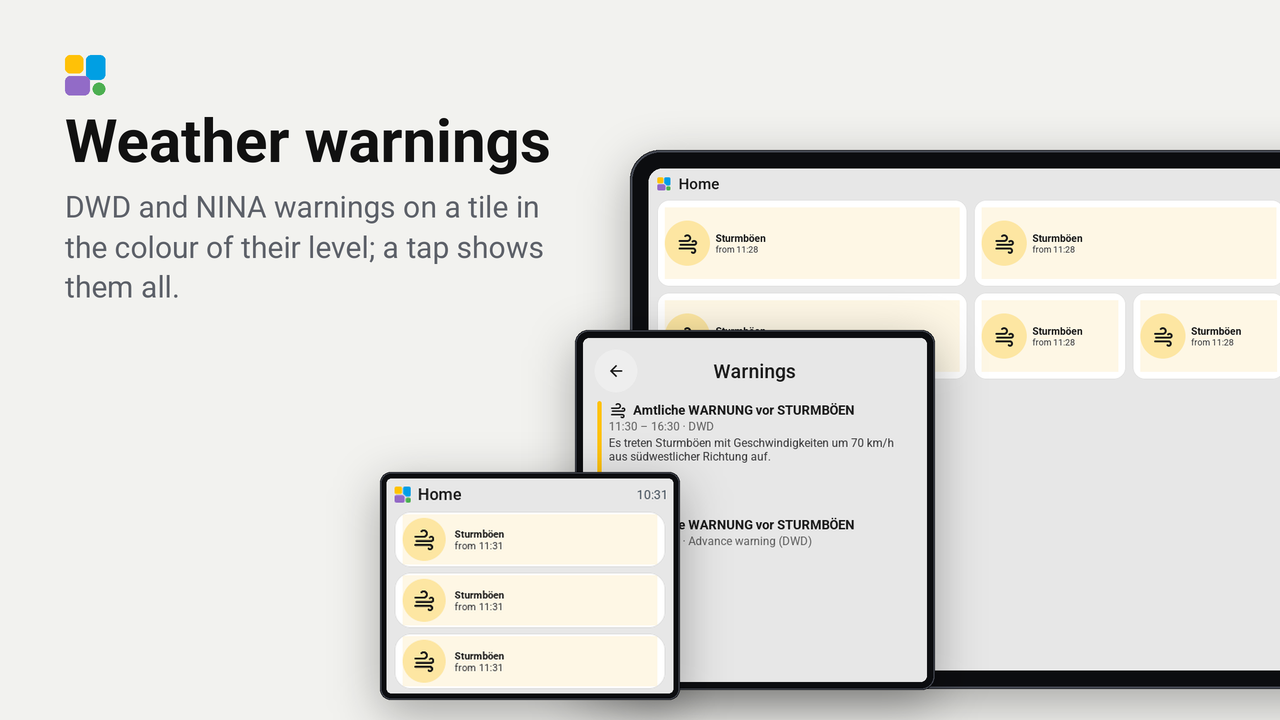
Weather warnings
DWD and NINA warnings on a tile in the colour of their level; a tap shows them all.
Warnings of the DWD and NINA from Home Assistant on one tile, in the spirit of the Lovelace nina-dwd-card.
The tile (1 x 1 and up) shows the strongest warning in force: its icon (thunderstorm, wind, rain, snow, ice, fog, heat ...) in a circle of its level's colour, its short name ("Sturmböen") and until when it lasts, and "+2" when there are more. The tile itself takes the level's colour lightly: yellow for a weather warning, orange for notable weather, red for severe weather, purple for extreme weather. NINA's severities count the same (Minor, Moderate, Severe, Extreme). Without a warning it shows a quiet shield and "No warnings", or the DWD's advance warning, muted.
A tap opens a card with every warning, the strongest first and the advance warning last: a bar in its level's colour, its icon and headline, when it is in force and where it comes from, and its text in as many lines as fit.
Set up
- Have the DWD Weather Warnings integration for
your region (sensors
..._current_warning_leveland..._advance_warning_level) and, if you like, the NINA integration (binary sensorsbinary_sensor.warning_<place>_1and so on). - In Tessera, open Plugins, Add with a link, and paste the link of this repository. Add the plugin to a screen.
- In the plugin's details on the screen's Plugins tab, under When building, choose DWD current warning level, DWD advance warning level and up to two NINA warning slots; leave out what you do not use. Save and build.
- In Layout, place the Weather warnings tile.
Good to know
- The screen reads the sensors and their attributes itself; a change of the chosen entities builds the screen again.
- The DWD's first three warnings, its first advance warning and two NINA slots are shown.
- Without a time the tile names the source ("DWD", "NINA"). A DWD level whose warnings have no details (yet) shows as "Warning level 1".
NINA with headline and times
Newer Home Assistant versions give NINA's binary sensors only the attribute id; the headline, severity, text and
times come from the action nina.get_details. Without them the tile shows "NINA warning" in its colour. A template
binary sensor brings them back as attributes; choose it instead of the NINA sensor in the plugin's details. Put it in
configuration.yaml (or a file of your template: folder), with your sensor in place of
binary_sensor.warning_place_1, once per slot:
template:
  - triggers:
      - trigger: state
        entity_id: binary_sensor.warning_place_1
      - trigger: homeassistant
        event: start
      - trigger: time_pattern
        minutes: "/10"
    actions:
      - action: nina.get_details
        target:
          entity_id: binary_sensor.warning_place_1
        response_variable: nina
        continue_on_error: true
    binary_sensor:
      - name: NINA warning details 1
        unique_id: nina_warning_details_1
        state: "{{ is_state('binary_sensor.warning_place_1', 'on') }}"
        attributes:
          headline: "{{ ((nina | default({}, true)).get('binary_sensor.warning_place_1') or {}).get('headline', '') }}"
          severity: "{{ ((nina | default({}, true)).get('binary_sensor.warning_place_1') or {}).get('severity', '') }}"
          description: "{{ ((nina | default({}, true)).get('binary_sensor.warning_place_1') or {}).get('description', '') }}"
          start: "{{ ((nina | default({}, true)).get('binary_sensor.warning_place_1') or {}).get('start', '') }}"
          expires: "{{ ((nina | default({}, true)).get('binary_sensor.warning_place_1') or {}).get('expires', '') }}"