 tessera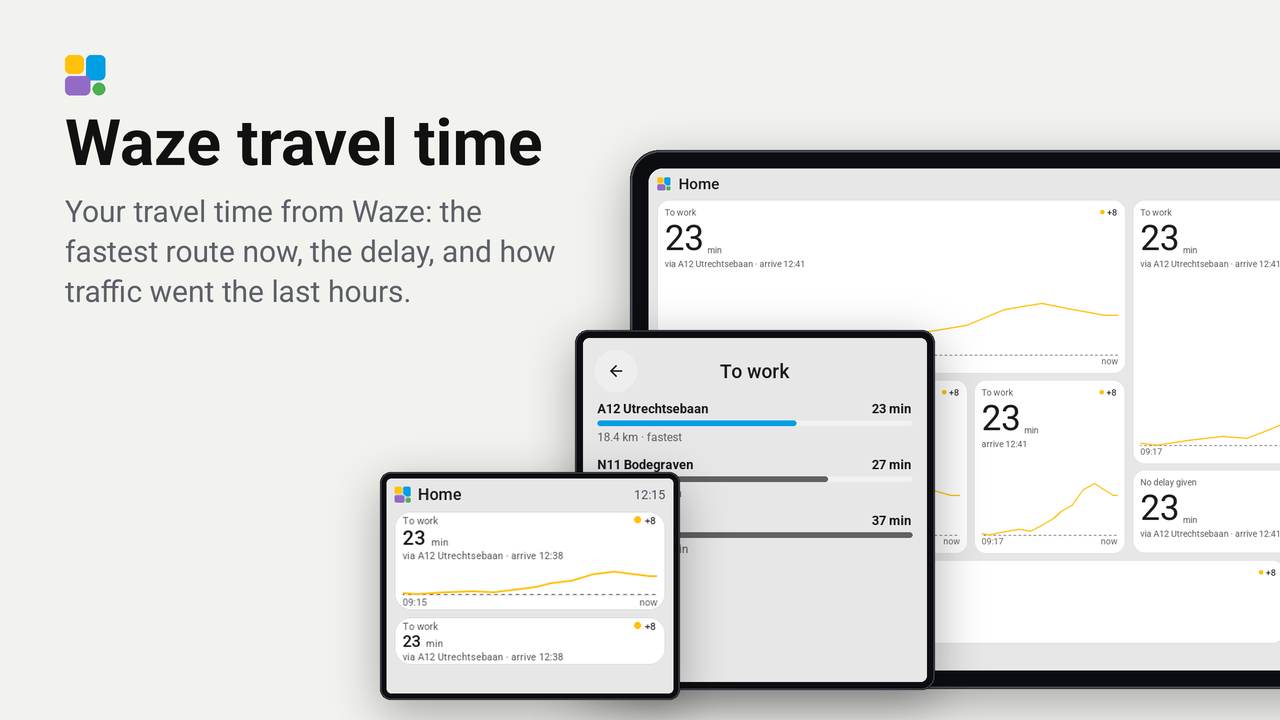
Waze travel time
Your travel time from Waze: the fastest route now, the delay, and how traffic went the last hours.
No rating yetRatings come from people who run it, in the Tessera app
0people like it, some without running it
0homes use it, of those who share that
Your travel time from Waze on a Tessera screen: how long the trip takes now, how far that is off your usual time, the route Waze picks and when you arrive, with a line of how the travel time went over the last hours. A tap opens a card with every route Waze offers right now, fastest first.
It reads a sensor of Home Assistant's own Waze Travel Time integration. No key, no account and no web service of its own: Home Assistant asks Waze, the plugin asks Home Assistant.
Set up
- In Home Assistant, add the Waze Travel Time integration (Settings, Devices and services, Add integration) with
your two places, for example
zone.homeand your work address. It makes a sensor such assensor.home_to_work. Keep the Recorder on for it (it is by default): the line on the tile comes from its history. - In Tessera, open Plugins, choose Waze travel time and tick your screens. Each screen builds once with the plugin.
- Put the tile Travel time on a page and choose the Waze sensor in its inspector.
- In the inspector, set:
- Usual travel time: your time without traffic, in minutes. The tile then shows the delay ("+8") in green, amber or red, and the line gets a dashed line at that time. Leave it at 0 for no delay.
- Hours on the line: how far back the line goes, 1 to 8 hours (0 for no line).
- Waze region: the same region as your Waze Travel Time integration, for the routes on the card.
On the screen
- 1x1: the minutes, the delay top right, and when you arrive.
- 2x1: the same, with the route ("via A12").
- 2 rows or more: the line of the last hours under it, from green to red with the delay, and the usual time dashed.
- Tap: the card with every route Waze offers now, each with its time, a bar, its distance and how much slower it is than the fastest.
Good to know
- The line comes from the sensor's history in Home Assistant (
history/history_during_period), asked once when the tile is made; every new travel time after that is added on the screen. The sensor updates every 5 minutes by default, so the line moves in steps of about 5 minutes. - The card asks Waze through Home Assistant's
waze_travel_time.get_travel_timesaction each time it opens, with live traffic. It uses the sensor's own start and end, but not the sensor's other options (avoid tolls, filters). - Waze Travel Time is an unofficial client of Waze's live map: when Waze changes something, the integration (and so this plugin) may stop until Home Assistant fixes it.
- Works on every board, the CYD included: it shows no pictures.
- Tried on Tessera's preview bench (the CYD, the Guition 4-inch, the Waveshare 4.3-inch standing up and the Guition 10.1-inch, light and dark), not yet on a real screen. Found something wrong? Open an issue.
How it works
tessera-plugin.yaml: a tile of a sensor with the attributesroute,distance,originanddestination, a card, and the two Home Assistant commands it may ask, with the history mapped to two lists of numbers.components/waze_traveltime/: the tile (the line is drawn on the screen from the samples), the card, and the plugin that hands each answer to the tile or card that asked.