 tessera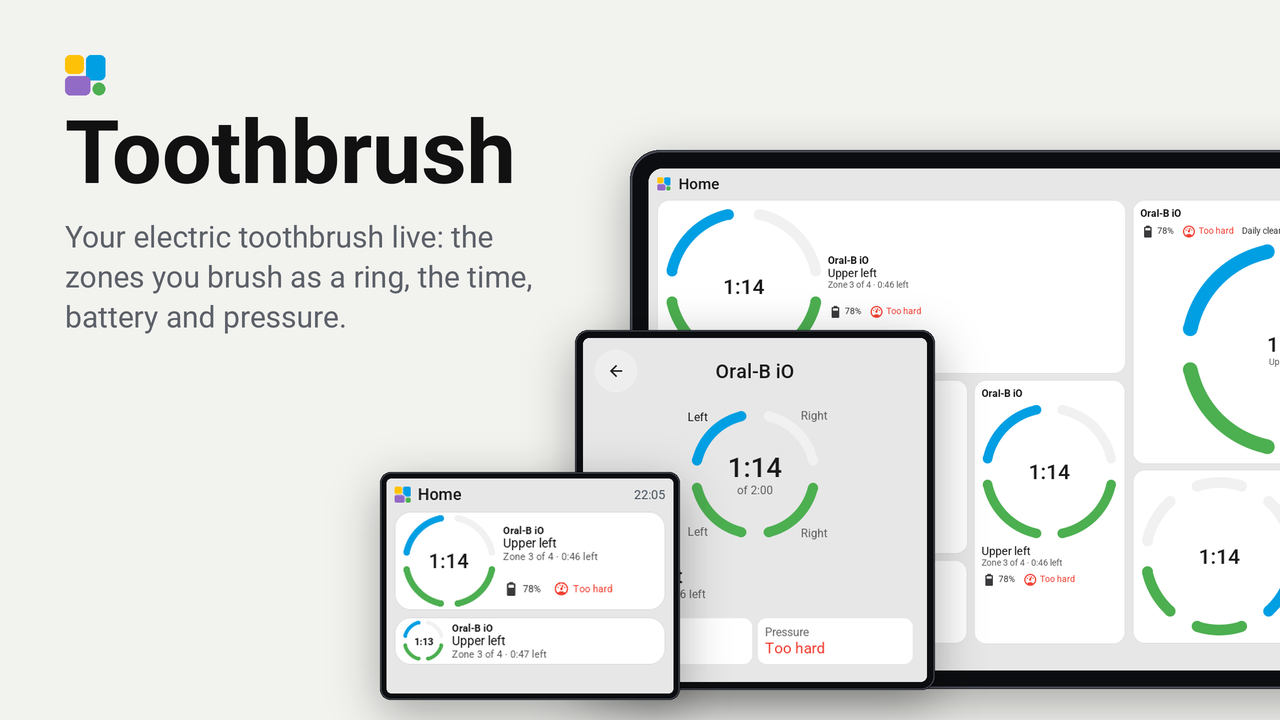
Toothbrush
Your electric toothbrush live: the zones you brush as a ring, the time, battery and pressure.
Your electric toothbrush live on a Tessera screen. The zones you brush show as a ring around the time: the upper jaw on top, the lower jaw below, a zone done in green and the one you brush now in the accent. Battery, pressure and mode sit beside it, and a tap opens the whole session over the page.
It works with the toothbrushes Home Assistant knows over Bluetooth: Oral-B (oralb, oralb_live), Philips Sonicare
(philips_sonicare_ble), Xiaomi (xiaomi_ble) and Laifen (laifen_ble). It is a Tessera version of
toothbrush-card by mtheli, whose zone and session logic it follows.
Set up
It needs a Tessera with plugin API 0.15: Tessera's dev branch until its next release.
-
In Tessera, open Plugins, choose Add with a link and paste this repository's link.
-
Tick the screen in the bathroom and apply. The screen builds once.
-
In Layout, place the Toothbrush tile from the library's Plugins group, at any size from 1x1 to 4x4.
-
In the inspector, choose the brush's entities. Only Toothbrush is needed; each other one adds its reading:
Option Oral-B ( oralb,oralb_live)Sonicare ( philips_sonicare_ble)Laifen ( laifen_ble)Xiaomi ( xiaomi_ble)Toothbrush …_toothbrush_state…_handle_state…_status…_toothbrushZone …_sector…_sectorleave empty leave empty Brushing time …_time…_brushing_time…_timerleave empty Battery …_battery…_battery…_battery…_batteryPressure …_pressure…_pressure_state…_pressing_too_hardleave empty Mode …_mode…_brushing_mode…_modeleave empty Brush head …_refill_daysbrush head wear (its brush head device) leave empty …_consumableLast session …_last_session…_last_sessionleave empty …_scoreThe lists are searchable: type the brush's name. Another choice shows at once, without a build.
-
Check the other options: the number of zones (Auto, 4 or 6), the length of your routine, how long the result stays, and what the brush head counts (days, percent or sessions).
What it shows
- 1x1: the ring with the time in its middle.
- 2x1 and wider: the ring on the left; the zone, how far you are and the chips on the right.
- 1x2 and taller: the ring on top; the zone, how far you are and the chips under it.
- 2x2 and up: the name, battery, pressure and mode, and a large ring.
- A tap: the full-screen card, with every zone named around the ring and every reading.
After a session the ring stays green for as long as you chose ("Done"), or shows how far you got ("Stopped early").

The full-screen card on a 10-inch screen, in the middle of a six-zone session:

Every tile at every size on every screen, drawn by the real firmware on Tessera's preview bench, is in renders/ (overview): one folder per screen, light and dark, with the finest grid of each in a folder of its own.

Good to know
- Tessera sends the entities you choose to the screen and follows them. Nothing is needed in Home Assistant: no template, no helper, no integration of its own.
- Each tile has its own brush, so a screen can show several: one tile each.
- A brush without a zone sensor (Xiaomi, Laifen) gets its zones by time, evenly over the routine.
- Auto zones show 4 until the brush reports a fifth zone; choose 6 for a brush that brushes in six from the start.
- Tried on: Tessera's preview bench (the CYD, the Guition 4-inch, the Waveshare 4.3-inch standing up and the Guition 10.1-inch), not yet on a real screen with a real brush. Please say in an issue which board and brush you used.
Privacy
It talks to nothing outside your home: Tessera sends the screen the states of the entities you chose in the tile's options, from your Home Assistant.