 tessera
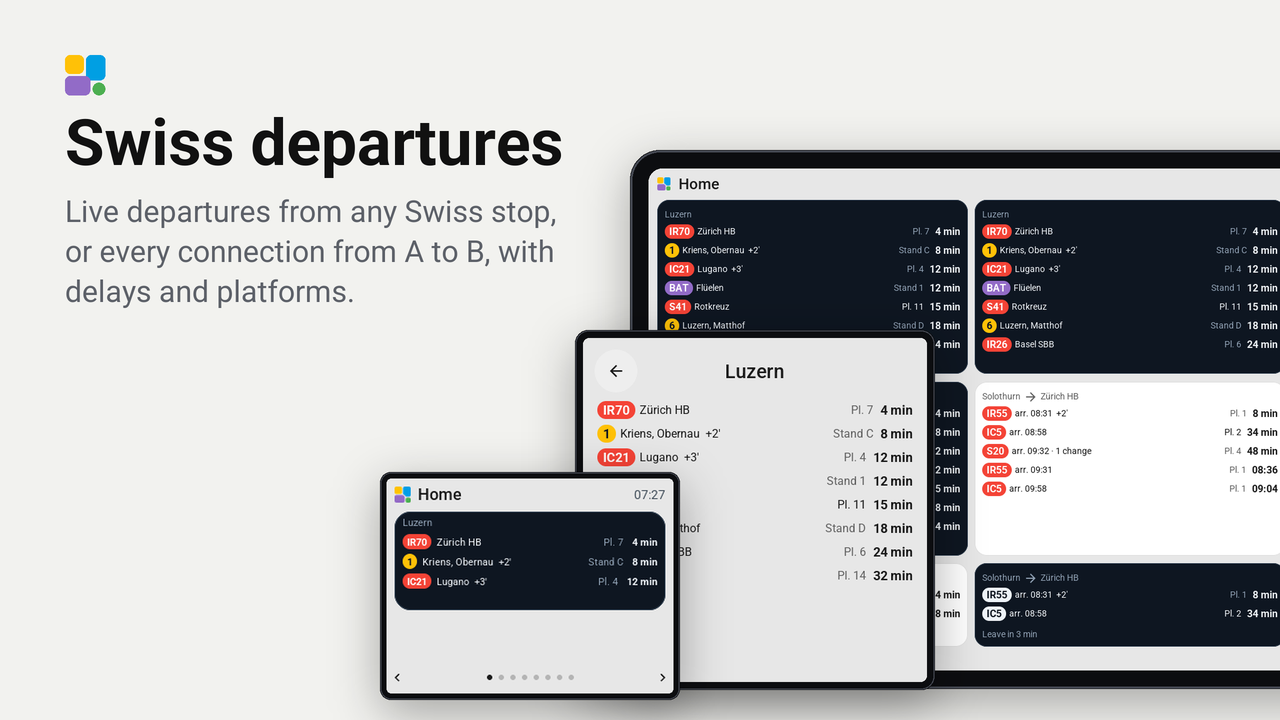
Swiss departures
Live departures from any Swiss stop, or every connection from A to B, with delays and platforms.
Live Swiss public transport on a Tessera screen: when the next train, tram, bus, boat or cable car leaves any stop in Switzerland, and every connection from one stop to another, with delays, platforms and platform changes. The times come from transport.opendata.ch, the open service over the Swiss timetable and its real-time data (every operator: SBB, BLS, ZVV, PostAuto and the rest). It needs no account and no key.
Not made by or affiliated with SBB CFF FFS or any transport operator.
What it adds
Next departure. The departures of one stop, under its name. On a single cell, the next one as big as the cell allows, with its line (S6, IC5, 14) and where it goes above it, and under it the platform and the two after it. On a tile of two columns or more, a list: one row per departure with its platform and countdown.
Connections. The trains from one stop to another, as the Swiss journey planner finds them: also a train that runs on beyond your destination (from Solothurn to Zürich HB that is the IC 5, which goes on to Rorschach, and the IR 55). Each row has the line, when it arrives, how many changes it takes, the platform and the countdown, under the title "Solothurn -> Zürich HB".
A card for each. Tap a tile to open it. A Next departure tile shows every departure of its stop. A Connections tile shows every connection, with when it leaves and arrives, how long it takes, its changes, its platform and how full the train is (when the service knows). Tap a connection, on the card or in the tile's list, to see its legs: each train and where it goes, where and when you board and get off with the platforms, any walk, and the minutes you have to change. Back returns to the list.
Set up
- Add the plugin to a screen in Tessera (Plugins, or the Plugins tab of the screen). The screen builds once.
- In Layout, place Next departure or Connections from the library's Plugins group.
- In the inspector, under Stop (or From and To), type a few letters of the station or stop (
Zürich HB,Bern, Bahnhof,Lausanne, Flon) and pick it from the list. - If you like, keep a Next departure tile to one Transport (train, tram, bus, boat, cable car), one Line or one Direction, or a Connections tile to Direct only.
- Set Walk to the stop to the minutes you need. Departures you can no longer make are skipped, and the tile says "Leave in 3 min", then "Leave now".
- Under Colours, choose its look (below).
Colours
- Look: Tessera (the screen's own blue badges), Swiss red (red line badges, as on the boards in the stations) or Station board (the tile a dark board with white words, in light and dark alike; its card takes the red badges).
- Colour by transport: trains red, trams and metros blue, buses yellow, boats purple, cable cars green.
- Colour when it's time to leave: with a walk to the stop, the tile turns orange in the minute you should set off.
- The colours are the screen's own, so they follow its light and dark look. You can still give the tile a colour of your own in the editor; the station board keeps its dark face.
Good to know
- Tessera asks transport.opendata.ch once a minute per stop or connection, for every screen and tile together. The screen counts down on its own clock in between, in minutes ("8 min"), and the next departure to the second in its last two minutes (1:42, 0:42). A time an hour or more away is shown as a time of day.
- A departure that runs a minute or more late gets "+2'" behind where it goes, and its countdown includes the delay. A connection's arrival time includes its delay at the destination too. Turn Show delays off to leave the "+2'" out.
- The platform of a train (Pl. 7) or the stand of a bus or tram (Stand D) shows when the service knows it. A platform that changed shows the new one, in full ink on a list. Turn Show platform off to leave it out.
- Direction keeps the departures whose last stop is that place. A Swiss stop usually serves both directions with one id, so this is how a tile keeps to one side. For trains that only pass through a place, use Connections.
- Line matches by line number. At a big station a train and a bus can share a number (S5 and IC5); set Transport as well to keep them apart.
- The Connections tile asks the journey planner for the next connections from now. A train that already left by the timetable but runs late is not among them.
- The legs of a connection are asked when you tap it, not before, so the card may say "Asking for the route" for a moment; while the card stays open they are asked again every minute and a half. A connection with more legs than fit says how many more there are.
- Colour when it's time to leave needs a walk to the stop; without one it does nothing.
- A departure that is due says "now".
- When the service does not answer, the tile keeps the last times it had and says they may be old.
- In English, German, French and Italian: it follows the screen's language.
- Works on every board. Made and used daily on a Guition 4-inch (ESP32-S3), and drawn on the CYD, a 4.3-inch standing and a 10-inch screen as well.
Privacy
Tessera (the app in Home Assistant, not the screen) asks transport.opendata.ch for the departures of the stops you
choose, the connections between the From and To stops of a Connections tile, the legs of a connection you tap, and stop
names while you search in the inspector. The service sees the address of your Home Assistant, those stop ids, times and
what you type in the search, nothing else. No key, account or personal data is sent.
How it works
tessera-plugin.yaml: the two tiles, their options, the card, and the fetches the app carries out: stops by name for the search; the departures of a stop (and from the same answer, the lines and directions for the inspector); the connections between two stops; and the legs of one connection, which the card asks for when you tap it.components/swiss_departures/: the ESPHome component that draws the tiles and the card and counts down.translations/: the words on the screen (screen) and in the app (app).
Data: transport.opendata.ch by Opendata.ch, from the Swiss open transport data platform (opentransportdata.swiss).