 tessera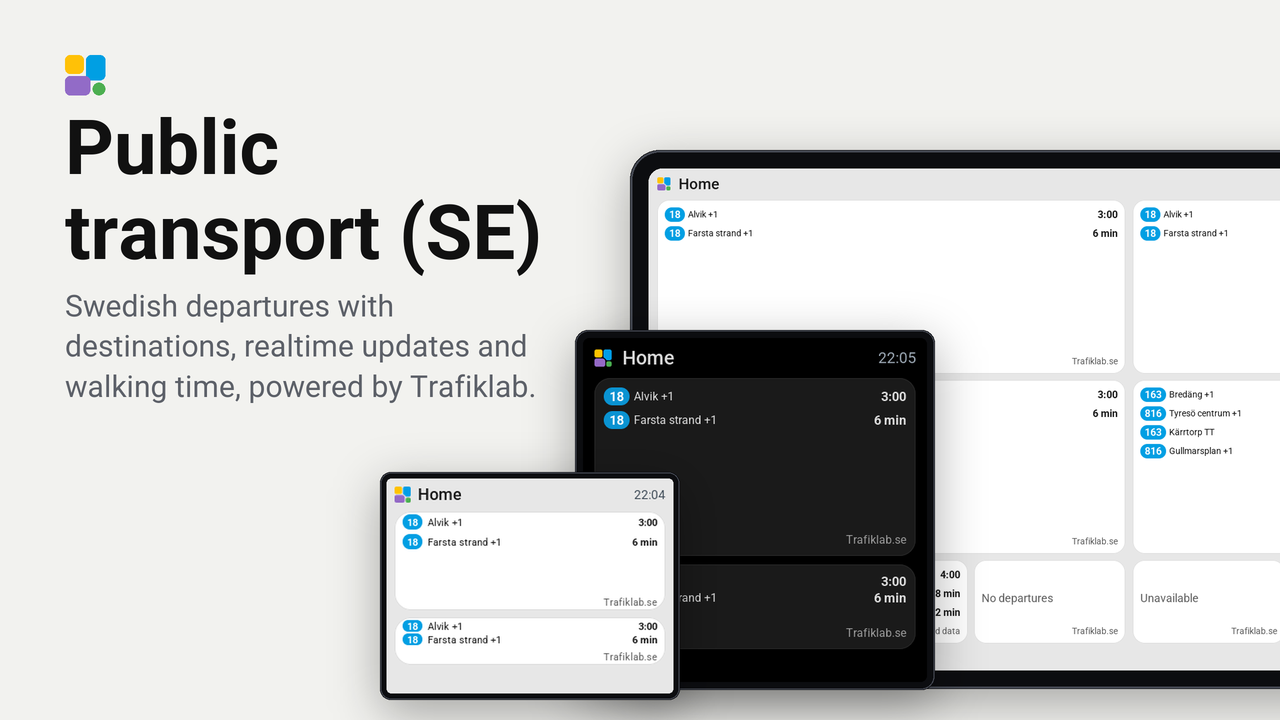
Public transport (SE)
Swedish departures with destinations, realtime updates and walking time, powered by Trafiklab.

Svenska · Changelog · Validation
Swedish public transport departures on Tessera ESP32 screens, using Trafiklab Timetables. Install once and add multiple tiles, each with its own stop, one to eight selected lines, transport mode and optional destination. These instructions describe plugin 0.2.2. Swedish and English translations are included. This beta requires Tessera plugin API 0.12 (Tessera 0.4.89 / firmware 0.57.0 or later compatible versions).
Set up
- Register an account at https://trafiklab.se.
- Create a key for Trafiklab Realtime APIs at https://developer.trafiklab.se/. A ResRobot key is a different product.
- In Tessera, open Plugins, choose Add with a link, and enter https://github.com/ExhaleSthlm/tessera-plugin-sweden-public-transport.
- Add the plugin to the intended screen, then build and install its firmware. Adding the plugin to the list alone does not install its code on the screen.
- Enter the API key in the plugin's secret Trafiklab API key input. Never put it in YAML or Git.
- Add a Departures tile in Layout. Open Stop, type at least two characters, and select a result. Its name stays visible after searching.
- Under Lines, add one to eight lines from that stop. Remove a selection with ×. Select the transport mode and, optionally, an exact destination.
- Save and send the layout. Wide tiles show a departure list, including the Guition 1×3 grid; narrow tiles emphasize the next departure.
The stop picker uses Trafiklab Stop Lookup. It searches after a short pause while typing; Tessera caches searched choices for ten minutes. At most 48 results are offered, so use a specific name. Line choices include each line once across both directions, using departures in the next 60 minutes; a line without departures in that window may be absent. Choices include all modes at the stop; the separate mode filter controls displayed departures. Destination text must be an exact, case-sensitive match.
At least one line is required. Removing all line selections shows Choose lines and stops that tile from requesting scheduled departure updates after saving the layout. Other tiles using the same stop can still keep its shared fetch active. An open editor can still request line choices. After changing stops, remove the old line selections and choose lines for the new stop; Tessera does not reset dependent selections automatically.
| Tile | Stop ID | Mode | Lines | Destination |
|---|---|---|---|---|
| Blåsut metro | 740021703 |
Metro | 18 |
empty |
| Dalens sjukhus buses | 740065542 |
Bus | 163, 816 |
empty |
The IDs above are for reference; the search picker stores them for you. Both examples show both directions. Blåsut's stop group also includes buses, so select Metro explicitly.
Upgrading from 0.1.x or 0.2.0
Update Tessera to 0.4.89 or a later compatible version first, then update this plugin to 0.2.2 in Tessera’s Plugins view. When upgrading from 0.1.x, select the stop again in the new searchable picker. When upgrading from either 0.1.x or 0.2.0, select the lines again in the new Lines control; the previous two scalar line fields cannot be converted automatically by the plugin. Save/send the layout and rebuild/install the screen firmware. Existing walking time, mode, destination and delay settings keep their option IDs.
Reading the tile
- Destination identifies the direction. The next departure counts down; larger tiles list more departures.
+2means two minutes late.TTmeans timetable only, without a realtime prediction.- Walking time hides departures you cannot reach. The countdown still shows time until departure, not time to leave home.
- Canceled departures are omitted. Empty results say “No departures”; this covers the API's next 60 minutes only.
- “Old data” means the last successful response is being shown after a fetch failure. The source credit alternates this warning and the data attribution. Both use the full footer width and are right-aligned.
- The compact source credit shows Trafiklab.se in the smallest theme text size. It sits below the departures, keeping all departure times aligned. Row spacing tightens where needed to fit three departures plus the credit on Guition 1×3. The editor's simplified preview does not reproduce every screen annotation.
Requests and limits
Tessera fetches every 60 seconds for each distinct stop URL and shares its response between tiles of this plugin. Two stops continuously active use an estimated 89,280 departure requests in 31 days, before editor lookups and retries. Searched stop choices are cached for ten minutes by Tessera. Line choices use the same departure URL and 60-second cache as the tile; opening them can fetch data when that cache is cold. As checked on 2026-10-18, Realtime Bronze allows 100,000 requests/month and 25/minute, which accommodates these two stops with some margin. More stops or other users of the same key need their own budget. This is an estimate, not an enforced account-wide cap.
The interval is currently a manifest constant. Tessera 0.4.89 has no plugin setting for runtime fetch intervals, polling schedules, or computed editor fields. See ROADMAP.md for these requested enhancements. Each selected line filters the shared response before the results are merged, sorted and limited. The plugin sends at most the next 12 filtered departures, bounded further by Tessera's message budget; very frequent services or long walking times can exhaust this window before the next refresh. The response must fit Tessera's 64 KiB fetch limit. Busy hubs may exceed it; filtering happens after download and cannot reduce the HTTP response size. The two example stops returned approximately 17 KB and 9 KB during initial verification, not a guarantee for every time of day.
Trafiklab returns local timestamps without UTC offsets. They are interpreted in Europe/Stockholm. During the repeated hour when daylight saving ends, an offset-free time can be ambiguous. Realtime availability varies by operator. Missing realtime is labeled TT, not represented as a live prediction.
Privacy
The Tessera app in Home Assistant sends stop-name search text, selected stop IDs and the API key over HTTPS to realtime-api.trafiklab.se. The key is sent as a query parameter using Tessera’s secret substitution. Line, mode and destination filters are applied in Tessera after the response is downloaded.
Trafiklab sees those values and your public IP address. The key is a Tessera secret input and is never sent to the display or stored in this repository.
The plugin does not read Home Assistant entities or call Home Assistant actions.
Data and license
Data from Trafiklab.se, under CC BY 4.0. The plugin filters and reformats the data into countdowns. Trafiklab requires source attribution on screens and website widgets displaying this data; see the Timetables attribution requirement. This is why the tile retains a visible “Trafiklab.se” credit. The exact placement is our layout choice, not a requirement: the compact credit sits below the departure rows. Keep attribution when adapting the display. This README links the data source and license and explains the transformation above.
Plugin code is MIT licensed. The tile adapts Max Gramser's MIT-licensed ov_departures; its copyright and license are preserved in NOTICE.
Development
Use Python 3.13, a C++ compiler and SDL2 (see the upstream preview setup instructions). From this plugin's repository, create fresh sibling checkouts matching CI and follow AGENTS.md:
git clone https://github.com/MaxGramser/tessera-plugins ../tessera-plugins
git -C ../tessera-plugins checkout a625674da86a6f2ba7577626407c26224ca9378c
git clone https://github.com/MaxGramser/homeassistant_espscreen ../homeassistant_espscreen
git -C ../homeassistant_espscreen checkout 9f6ab3c68d420f454fb905466696063b1d789049

export TESSERA_TREE="$(cd ../homeassistant_espscreen && pwd)"
export TESSERA_MANIFEST="$TESSERA_TREE/screen_manager/app/plugin_manifest.py"
export TESSERA_BOARDS="$TESSERA_TREE/screen_manager/app/boards.json"
python3 ../tessera-plugins/tools/preview.py --setup
export TESSERA_PYTHON="../tessera-plugins/tools/.cache/preview-venv/bin/python"
"$TESSERA_PYTHON" ../tessera-plugins/tools/check.py .
"$TESSERA_PYTHON" -m unittest discover -s tests -v
python3 ../tessera-plugins/tools/preview.py . --strict --grid 1x3
"$TESSERA_PYTHON" ../tessera-plugins/tools/store_image.py . --from .preview
If you already have these checkouts, use separate clean checkouts rather than replacing local work. The preview setup installs the tested ESPHome toolchain and test dependencies in its virtual environment. The core commit is the screens-v0.4.89 release; the plugin requires API 0.12, while that core provides API 0.14.
No API key is needed for the deterministic tests and previews. Never commit credentials or raw authenticated request URLs.
Physical hardware acceptance is separate from simulator checks; see VALIDATION.md.
GitHub Actions
The Plugin CI workflow runs on pushes, pull requests and manually from the Actions tab:
- Validates the API 0.12 manifest with Tessera 0.4.89’s API 0.14 validator and runs the deterministic mapper tests.
- Compiles the plugin C++ into the Guition host simulator and runs strict layout checks, including the 1×3 grid.
- Uploads preview images, logs and the report as the
guition-previewartifact for seven days, including on a failed preview when files are available.
No Trafiklab API key or Home Assistant credentials are needed; tests use fixtures and make no Trafiklab calls. The workflow has read-only repository permissions and does not publish releases or install firmware. Tessera and its plugin tools are pinned to the commits recorded in the workflow; update them deliberately when changing the supported API. A simulator build runs on Linux and is not an ESP32 firmware cross-build. Continue building the real Guition firmware in Tessera and testing it on the device. Check the result for the relevant commit under GitHub Actions; local validation is not evidence of a successful hosted run.