 tessera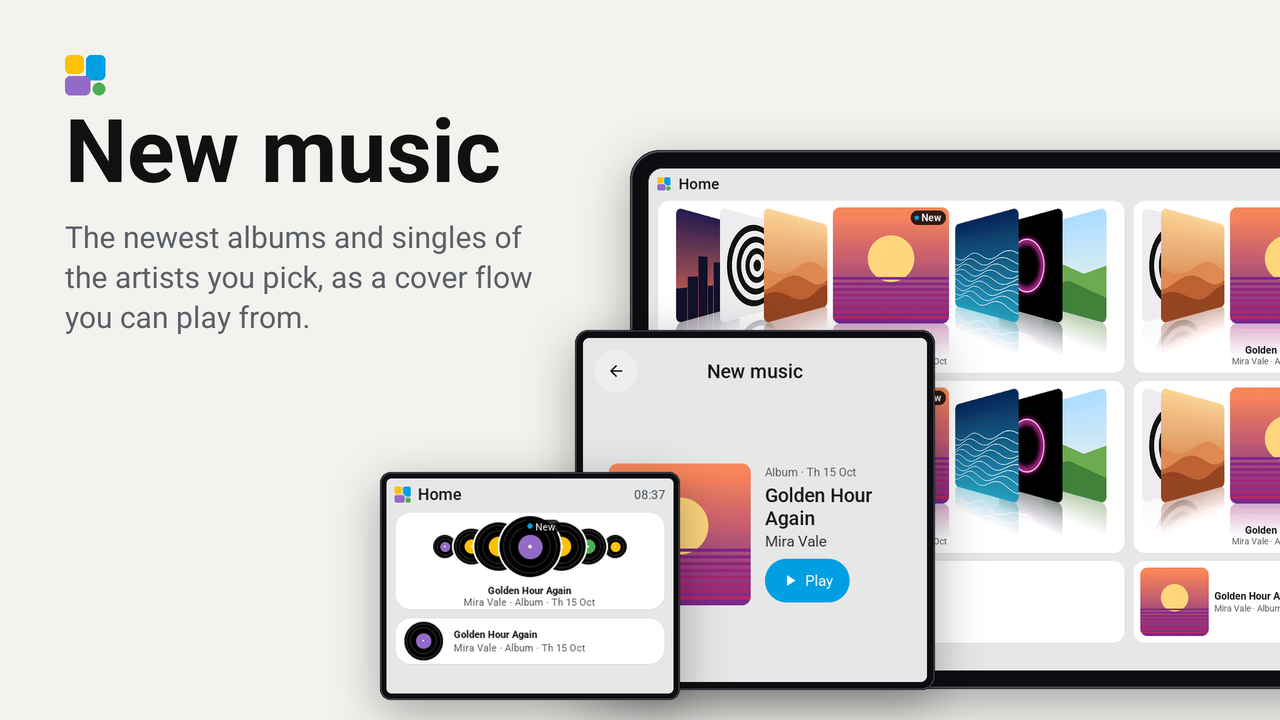
New music
The newest albums and singles of the artists you pick, as a cover flow you can play from.
How these numbers are counted
Everything here is shared by choice from the Tessera app, one per installation of the app, without an account. A like can come from anyone, also from someone who does not run the plugin. A rating comes from someone who has run it on a screen for a few days, and shows from 3 ratings. Homes are the installations that agreed to be counted and said in the last 30 days that they run it.
These are not verified installations or a quality score. Reinstalls and lost keys can affect them, and one home network adds at most two of each to a plugin.
What the app sharesThe newest albums, EPs and singles of the artists you pick, as a cover flow on a tile: the release in the middle large, "New" on its cover for two weeks after it came out, its title, artist and kind under it, the releases beside it turned towards it with a reflection under every cover. It moves on by itself every fifteen seconds and runs round. Tap left of the middle cover to go back one, right of it to go on one, and tap the middle cover to open the release with its cover large: a key there plays it on your Music Assistant player.
The artists, their releases and the covers come from Deezer. You do not need a Deezer account, and the music plays from whatever service your Music Assistant has (Spotify, Apple Music, Tidal, Deezer, your own files).
Set up
- Add the plugin to a screen in Tessera. The screen builds once.
- In Layout, place the New music tile from the library's Plugins group. Two rows high or more shows the cover flow; one row high shows a cover beside its title; one cell shows the cover alone.
- In the inspector, under Artists, type a name and pick the artist, up to eight. The newest releases of all of them show together, newest first.
- To play from the screen, choose the tile's player: the inspector offers the players of Music Assistant in Home Assistant. Without one the tile shows the releases, and the release's card says how to add a player.
- Show leaves the singles out; Next release every sets how often the flow moves on (0 keeps it still).
Good to know
- The releases are asked for every six hours, once for each artist. The tile shows the newest twelve of all artists together; a release two of your artists share shows once.
- Deezer lists a release a little ahead of its day: it shows "Out in 3 days" on its cover until it is out.
- Music Assistant finds the release by its title and artist on its own services, so it plays the best match it finds there. A release that is only on Deezer, with a Music Assistant without Deezer, may play another version or not at all.
- The screen must be allowed to perform Home Assistant actions (the ESPHome integration's option, which Tessera turns on when it adds the screen).
- A board without the memory for pictures (the CYD, the Waveshare 3.5-inch, the Hosyond 4-inch) shows a record for every release instead of its cover, its label in a colour of the artist's own, in the same cover flow.
Privacy
Tessera (the app in Home Assistant, not the screen) asks Deezer's API for the artists whose name you type and for the
releases of the artists you picked, and fetches the covers from cdn-images.dzcdn.net. Deezer sees the address of
your Home Assistant and those artists; nothing else of your home. Playing goes from the screen to Home Assistant and
Music Assistant only. The screen never reaches the internet.