 tessera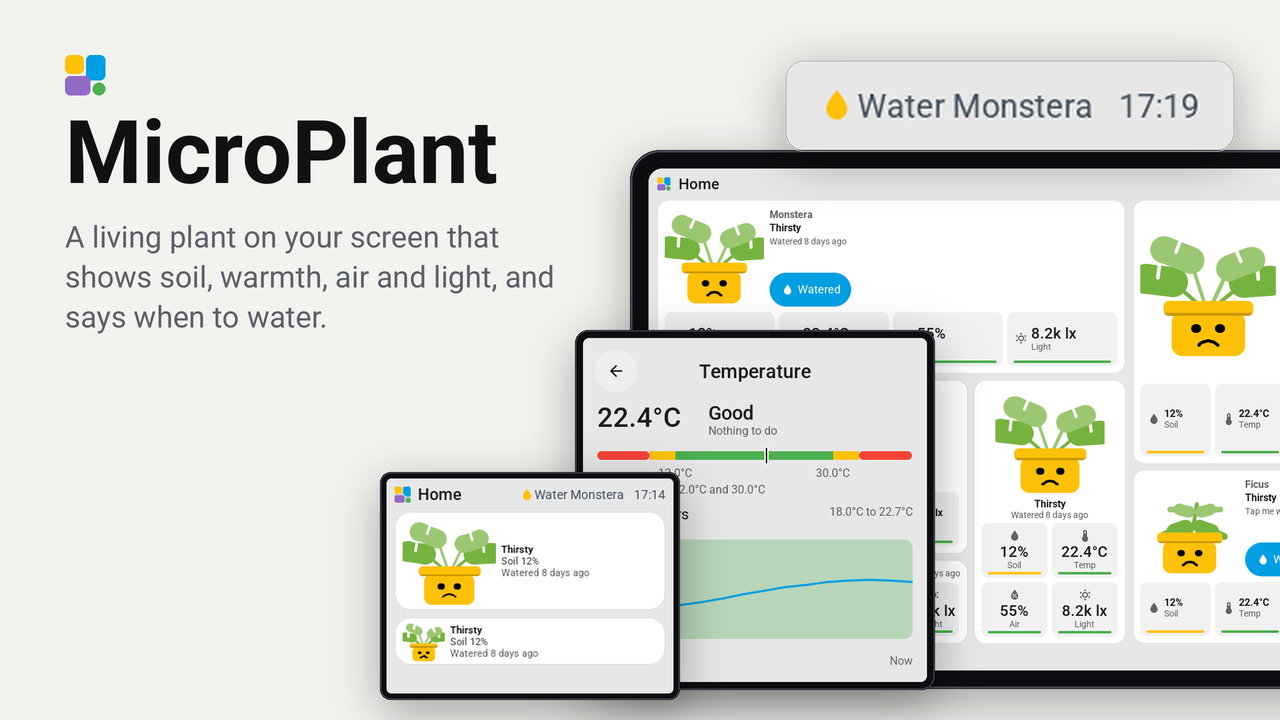
MicroPlant
A living plant on your screen that shows soil, warmth, air and light, and says when to water.
How these numbers are counted
Everything here is shared by choice from the Tessera app, one per installation of the app, without an account. A like can come from anyone, also from someone who does not run the plugin. A rating comes from someone who has run it on a screen for a few days, and shows from 3 ratings. Homes are the installations that agreed to be counted and said in the last 30 days that they run it.
These are not verified installations or a quality score. Reinstalls and lost keys can affect them, and one home network adds at most two of each to a plugin.
What the app sharesA houseplant that lives on your Tessera screen. It shows the soil moisture, temperature, air humidity and light of a real plant, and its face and leaves show how the plant feels: thriving with a flower, drooping when it is thirsty, sweating in the heat, shivering in the cold, asleep in the dark. Tap it when you water it and it says thank you.
Made for the 4-inch square screens (480 x 480), and drawn for every size from one cell to a page of its own.
Tried on: the Guition 4-inch square screen (480 x 480), where it works nicely. The other screens are drawn by Tessera's bench (the CYD, the Waveshare 4.3-inch portrait and the JC8012P4A1) but not tried on glass yet; a line in an issue helps if you run it on one.
What you see
- The plant, in the middle of the tile. Its mood follows the reading that is furthest out of its range, the soil first: Thriving, Thirsty, Very thirsty, Too wet, Too hot, Too cold, Needs light, Too much sun, Air too dry, Air too damp. It blinks and sways now and then.
- Four cells with the readings, each with a bar in green (in its range), amber (just outside it) or red (far outside it).
- When it was last watered: "Watered 3 days ago".
- The Watered key on a large tile. On every size, a tap on the plant itself also counts as watering.
- A tap on a reading opens its card: the value, a ruler from red through green, what to do ("Water it soon", "Move it nearer a window"), and its last 24 hours from Home Assistant's history.
- The top bar can show a watering can while a plant on the glass is thirsty (place Plant needs water on a page's bar).
| Size | What it shows |
|---|---|
| 1x1 | The plant, its mood, and the reading that matters most |
| 2x1 | The plant, its mood and the four readings in a row |
| 1x2, 1x3 | The plant on top, its mood and watering, the readings two by two |
| 2x2, 2x3 | The plant, its name, mood and watering, the Watered key, and four cells under it |
Set up
- In Tessera, open Plugins, choose Add with a link and paste the link of this repository. Add MicroPlant to your screen; the screen builds once.
- In Layout, place the Plant tile from the library's Plugins group. Until you choose an entity it shows a demo plant whose soil dries out in minutes, so you can try the moods and the watering at once.
- In the inspector, choose the tile's entity: best a plant of Plant Monitor (the plant itself, not one of its sensors): the tile finds its sensors and takes its good ranges from the plant. A sensor that has the readings as attributes, or a soil moisture sensor alone, works too, with ranges that suit a leafy houseplant: soil 30 to 70 %, 16 to 28 °C, air 40 to 70 %, light 1,000 to 25,000 lx (see "Where the readings come from").
- Optional, but best: make a helper in Home Assistant (Settings, Devices & services, Helpers, Date and/or time,
with date and time) and fill its id into Watering helper, such as
input_datetime.monstera_watered. A tap on the plant then sets it, every screen sees the same watering, and it survives restarts. An input_button or a button works too. - To act on the plant, the screen must be allowed to perform actions in Home Assistant (the ESPHome integration's option Allow the device to perform Home Assistant actions). Without it, watering is kept on the screen only.
Where the readings come from
The screen never makes a network connection of its own, by Tessera's rules. Home Assistant is the source:
- The tile's entity is sent to the screen by Tessera at every change: its state (the soil moisture) and its
attributes
moisture,temperature,humidity,brightnessorilluminance, andwatered_at. - A plant of Plant Monitor is asked for its sensors, their readings and its good ranges (
plant/get_info), through the Tessera app, every 60 seconds by default (the setting Plant poll seconds, 30 to 300), only while the tile is on the glass and the screen is awake. The watering helper is asked at the same pace. - A sensor node with a JSON API on your network (an ESP32 in the pot, say): Tessera does not let a plugin reach a local address, so let Home Assistant read it with a RESTful sensor, and choose that sensor as the tile's entity. Home Assistant asks it every 30 seconds:
# configuration.yaml
rest:
  - resource: http://192.168.1.50/api/plant     # your node's JSON, such as {"moisture": 41, "temperature": 21.8, ...}
    scan_interval: 30
    sensor:
      - name: Monstera
        unique_id: monstera_plant
        value_template: "{{ value_json.moisture }}"
        unit_of_measurement: "%"
        json_attributes: [moisture, temperature, humidity, illuminance]
- Separate sensors you already have, as one entity:
template:
  - sensor:
      - name: Monstera
        unique_id: monstera_combined
        unit_of_measurement: "%"
        state: "{{ states('sensor.monstera_soil_moisture') }}"
        attributes:
          temperature: "{{ states('sensor.monstera_temperature') }}"
          humidity: "{{ states('sensor.living_room_humidity') }}"
          illuminance: "{{ states('sensor.monstera_illuminance') }}"
          watered_at: "{{ states('input_datetime.monstera_watered') }}"
A temperature in °F is turned into °C. The card's 24 hours come from Home Assistant's statistics, so they show for a sensor with a
state_class (most do); a reading that is an attribute has no history of its own.
Settings
In the plugin's details on the screen's Plugins tab, in Home Assistant, and on the screen's own settings page (hold the top bar, Settings, Plugins, MicroPlant):
| Setting | What it does |
|---|---|
| Plant demo data | Every plant tile of this screen shows the demo plant. |
| Plant poll seconds | How often a tile asks Plant Monitor and the watering helper. |
| Plant watered at | The last watering of a plant without a helper, kept on the screen. The screen's settings page has a Watered now row for it. |
Privacy
Nothing leaves your home. The plugin reads only the entities you choose, through Home Assistant, and asks nothing of any service on the internet.
Good to know
- MicroPlant uses plugin API 0.10, which is on Tessera's dev branch until its next release: put the screen on the dev channel to build it today.
- A tile shows Offline when Home Assistant has not answered for a few minutes; it keeps the last readings.
- Amber means just outside the range (10 points for soil and air, 3 °C, or within half to twice the light range), red
means further out. The margins are at the top of
components/microplant/microplant_model.h. - After Watered, the plant says thank you for ten seconds, then shows its mood again.