 tessera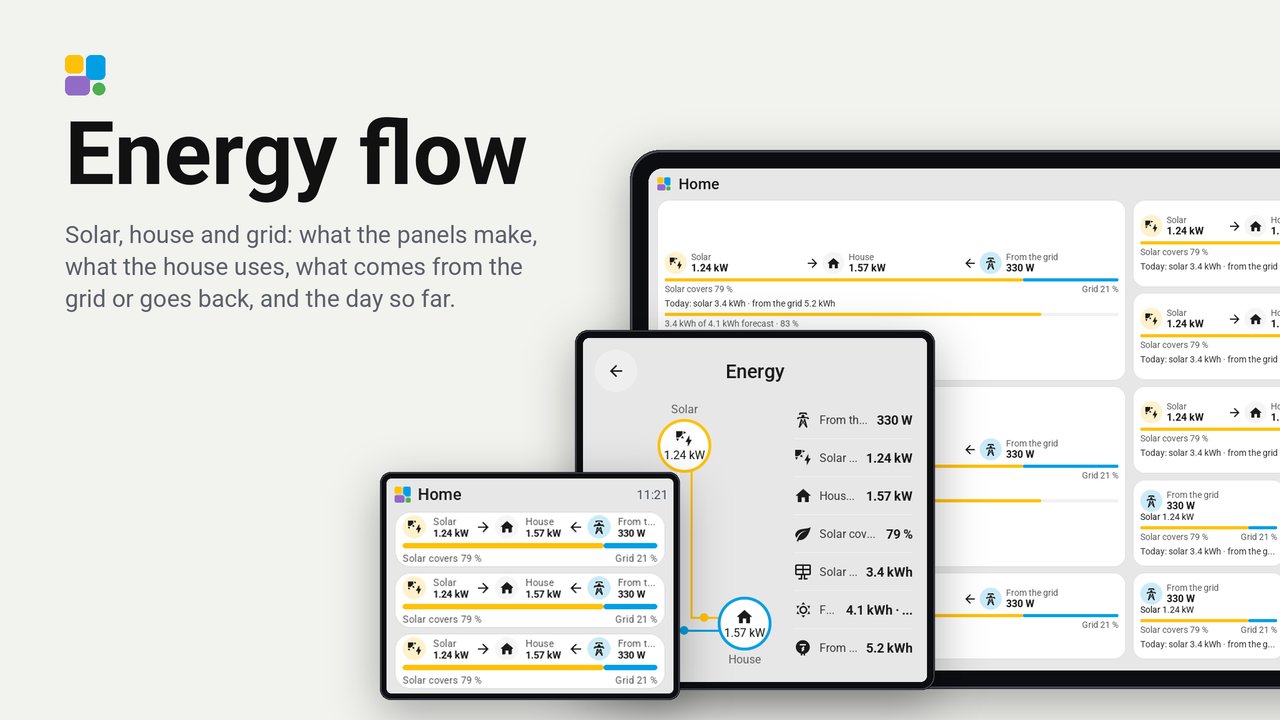
Energy flow
Solar, house and grid: what the panels make, what the house uses, what comes from the grid or goes back, and the day so far.
Electricity at home with solar panels on one tile, in the spirit of Home Assistant's energy dashboard.
The tile shows the sun, the house and the grid side by side: what the panels make now, what the house uses, and what comes from the grid or goes back to it. Arrows show where the power flows; a circle takes its colour while power flows there (amber for the sun, blue for power from the grid, green for power to it). Under them, when there is room:
- a bar of the house's use, amber as far as the sun covers it, blue for the rest ("Solar covers 46 %");
- the day so far ("Today: solar 3.4 kWh · from the grid 5.2 kWh");
- what the panels made against today's forecast, as a bar.
It fits any size from 1 x 1 to 6 x 3: on a narrow tile it shows the grid and, under it, the sun. Each part shows only while there is room for it and a sensor for it. A tap opens a card: at the left the flow as in Home Assistant's energy card, the sun above, the grid and the house below, joined by lines that take their colour and a dot where power flows; at the right every chosen sensor in a row of its own (grid, solar, house, coverage, solar today, forecast with how much of it is made, grid today).
Set up
- In Tessera, open Plugins, Add with a link, and paste the link of this repository. Add the plugin to a screen.
- In the plugin's details on the screen's Plugins tab, under When building, choose the sensors:
- Grid power (needed): your meter's power in W or kW, positive while power comes from the grid and negative while it goes back. A meter that counts the other way round: switch on Invert the grid on the tile.
- Solar power: what the panels make now.
- Solar today, Grid today: today's energy in kWh, for the day so far.
- Solar coverage: a sensor in % if you have one; without it the share is worked out from solar and grid.
- Forecast today: today's solar forecast in kWh (Forecast.Solar, Solcast). Leave out what you do not have. Save and build.
- In Layout, place the Energy tile.
Good to know
- The house's use is grid + solar. A battery is not part of it yet.
- W and kW, Wh and kWh are both understood: the plugin reads each sensor's unit.