 tessera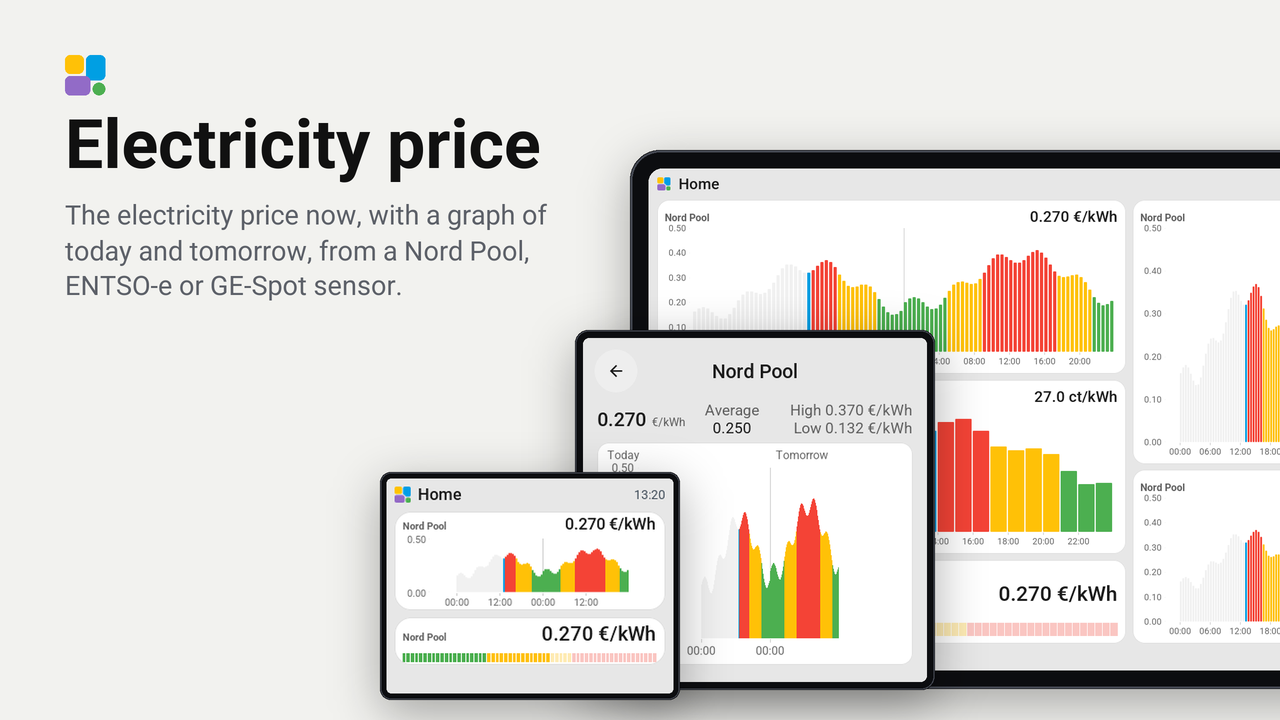
Electricity price
The electricity price now, with a graph of today and tomorrow, from a Nord Pool, ENTSO-e or GE-Spot sensor.
How these numbers are counted
Everything here is shared by choice from the Tessera app, one per installation of the app, without an account. A like can come from anyone, also from someone who does not run the plugin. A rating comes from someone who has run it on a screen for a few days, and shows from 3 ratings. Homes are the installations that agreed to be counted and said in the last 30 days that they run it.
These are not verified installations or a quality score. Reinstalls and lost keys can affect them, and one home network adds at most two of each to a plugin.
What the app sharesThe electricity price now as a tile, with the graph of today and tomorrow on bigger tiles and on a card of its own.
It reads the price sensor of Nord Pool (HACS nordpool), ENTSO-e (entsoe) or GE-Spot (ge_spot) in Home Assistant. For GE-Spot, use its price sensor in a currency per kWh (not the cents display).
It runs on every board Tessera supports (boards: any), from the CYD to the 10.1-inch screens.
Set up
- In Tessera, open Plugins and choose Electricity price, or choose Add with a link and paste
https://github.com/Heronimonimo/tessera-electricity-price. Tick your screens; each builds once. - In Layout, place the Electricity price (Nord Pool), Electricity price (ENTSO-e) or Electricity price (GE-Spot) tile from the library's Plugins group, at any size from 1x1 up to the whole page. A tile smaller than 2x2 shows the price with the meter bar; from 2x2 up it adds the graph.
- In the inspector, choose your price sensor. The list holds only the sensors that fit the tile you placed.
- Choose the unit, EUR/kWh (
0.273) or ct/kWh (27.3), and the number of decimals (in ct/kWh at most one). - Tap a bar of the graph to see its price and time slot for a few seconds, on a bigger tile and on the full screen card. On a tile, tap that bar again, or beside the bars, to open the card: the price now, the lowest and highest still to come, the day's average, and the graph.
Good to know
- The graph has a bar for every quarter of an hour when the sensor has quarter prices, else for every hour. A tile with more than 100 slots (quarters of today and tomorrow) joins neighbouring quarters into one bar; the card shows them all. Past bars are grey, the bar now is the accent colour, and the bars to come are green, amber or red by their place between the lowest and highest price. Prices below zero hang under the zero line.
- Tomorrow's bars appear on their own as soon as the sensor has them (the day-ahead prices come in the afternoon).
- The unit comes from the sensor (
EUR/kWhshows as€/kWh). A sensor that reports per MWh is shown per kWh. - On the days the clock changes, the graph has 23 or 25 hours, each where it is on the clock.