 tessera
Air quality
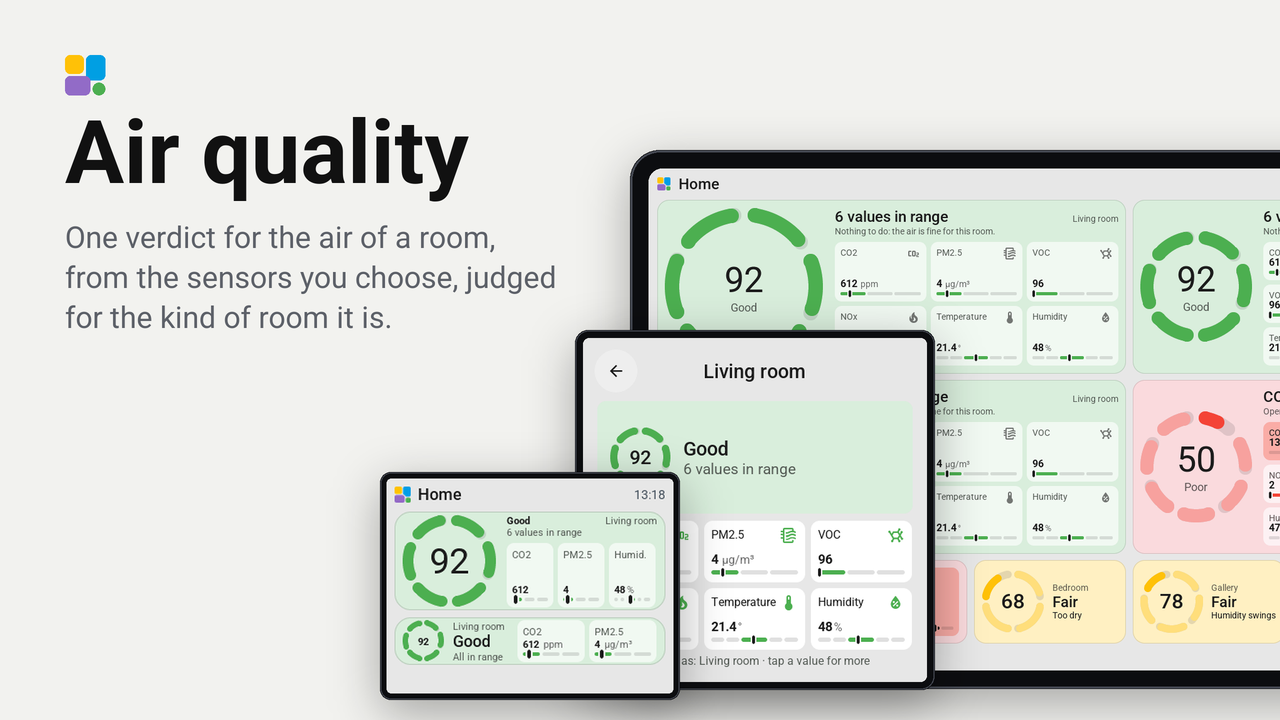
One verdict for the air of a room, from the sensors you choose, judged for the kind of room it is.
On each screen
| Screen | Rating | Ratings | Homes |
|---|---|---|---|
| Guition 4″ · ESP32-S3-4848S040 | Not yet | 1 | 5 |
| Guition 10.1″ · JC8012P4A1 V3 | Not yet | 0 | 1 |
| M5Stack Tab5 5″ · Tab5 ST7121 | Not yet | 0 | 1 |
How these numbers are counted
Everything here is shared by choice from the Tessera app, one per installation of the app, without an account. A like can come from anyone, also from someone who does not run the plugin. A rating comes from someone who has run it on a screen for a few days, and shows from 3 ratings. Homes are the installations that agreed to be counted and said in the last 30 days that they run it.
These are not verified installations or a quality score. Reinstalls and lost keys can affect them, and one home network adds at most two of each to a plugin.
What the app sharesOne tile that says how the air of a room is. You choose the room's sensors (an AirGradient ONE, or any CO2, particle, VOC, NOx, temperature and humidity sensors Home Assistant has) and the kind of room it is. The tile gives one verdict, shows which value is off, and tells you a first step.
- The card is the verdict. Green while everything is fine, yellow when a value is fair, red when one is poor.
- A ring with one arc for every sensor. An arc is whole while its value is ideal and gets shorter as it goes off. The number in the middle is the score of the worst value, from 100 (ideal) down to 0.
- The larger the tile, the more it shows. One cell holds the verdict and the reason. Larger tiles add a cell for each sensor with its value and a small scale: the mark is the value, the lit part the zone it is in.
- A tap opens the card with every value. When something is off it has a key, What to do. That key, or a tap on any value, opens an explanation: where it comes from, a first step, and its last 24 hours.
Set up
- Add the plugin to a screen in the Tessera app, and let the screen update.
- Put the Air quality tile on a page.
- In the tile's settings, choose the Kind of room. It sets what counts as good: a bedroom wants cooler, fresher air than a workshop.
- Choose the sensors. With Fill from a device you pick one device (an AirGradient ONE, for example) and every sensor it has is filled in. Or choose each sensor yourself: a field you leave empty does not count. One CO2 sensor alone is enough.
- Optional: under Limits of your own you set where "fine" ends for a value. An empty field keeps the room's limit, which the field shows.
How it judges
Every value gets a score: 100 is ideal, 80 is where fine ends, 60 where poor starts. The tile's verdict is that of the worst value, so one poor value never hides behind five good ones. The official air quality indexes work the same way.
What counts as fine, per kind of room:
| Room | CO2 fine up to | CO2 poor from | PM2.5 fine / poor | Temperature fine | Humidity fine |
|---|---|---|---|---|---|
| Living room | 1000 ppm | 1500 ppm | 10 / 25 µg/m³ | 19 to 24 °C | 40 to 60 % |
| Bedroom | 800 | 1000 | 10 / 25 | 16 to 20 °C | 40 to 60 % |
| Office | 800 | 1000 | 10 / 25 | 20 to 24 °C | 40 to 60 % |
| Music studio | 800 | 1200 | 10 / 25 | 20 to 24 °C | 45 to 55 % |
| Gallery or collection | 1000 | 1500 | 5 / 10 | 16 to 25 °C | 40 to 60 % |
| Workshop | 1000 | 1500 | 10 / 25 | 15 to 25 °C | 35 to 65 % |
| Nursery | 800 | 1000 | 10 / 25 | 16 to 20 °C | 40 to 60 % |
| Kitchen | 1000 | 1500 | 15 / 35 | 18 to 25 °C | 40 to 65 % |
- PM10 is fine up to twice the PM2.5 limit.
- VOC as an index (Sensirion's, as an AirGradient gives it) is fine up to 150 and poor from 250. The index is relative to the room itself: 100 is its average of the last day, so it says "more than usual", not how much. A VOC sensor in ppb is fine up to 220, one in µg/m³ up to 300.
- NOx as an index is fine up to 20.
- A music studio and a gallery also judge how even the humidity stayed: how far it moved in the last 24 hours. A studio is fine up to 15 points and poor from 30, a gallery fine up to 10 and poor from 20. Wood and paper suffer more from humidity that moves than from one that is a little off. It needs a humidity sensor with statistics in Home Assistant (every sensor with a state class has them).
The numbers follow what the World Health Organization (particles), Germany's Umweltbundesamt (CO2 below 1000 ppm, VOC), the WELL standard and studies of sleep and of work (CO2 below 800 ppm), the Bizot Green Protocol of museums (16 to 25 °C, 40 to 60 %, at most 10 points of humidity in 24 hours) and the makers of guitars and pianos (45 to 55 %) say. Where they disagree, the tile takes the middle.
The tips
The explanation says where a value usually comes from and what to try first: open a window for CO2, the cooker hood for fine dust and NOx, a humidifier for dry air. They are rules of thumb for a first step, written for a home. They are not medical or professional advice, and the tile is no alarm: a smoke or carbon monoxide detector stays what it is.
What it asks of Home Assistant
The tile reads the sensors you choose. For the last 24 hours it asks Home Assistant for the statistics of one sensor
(recorder/statistics_during_period): when you open an explanation, and every ten minutes for the humidity of a
studio or a gallery. Nothing leaves your home.